AI headshot from your own photo: 3 ChatGPT & Gemini prompts
Three copyable prompts for your own photo, with before-and-after examples and application-photo guidance for Germany, Austria and Switzerland.
DraftApply ·
Before → after
Fictional AI examples: casual photos and professional portrait styling.
Aisha: classic studio style
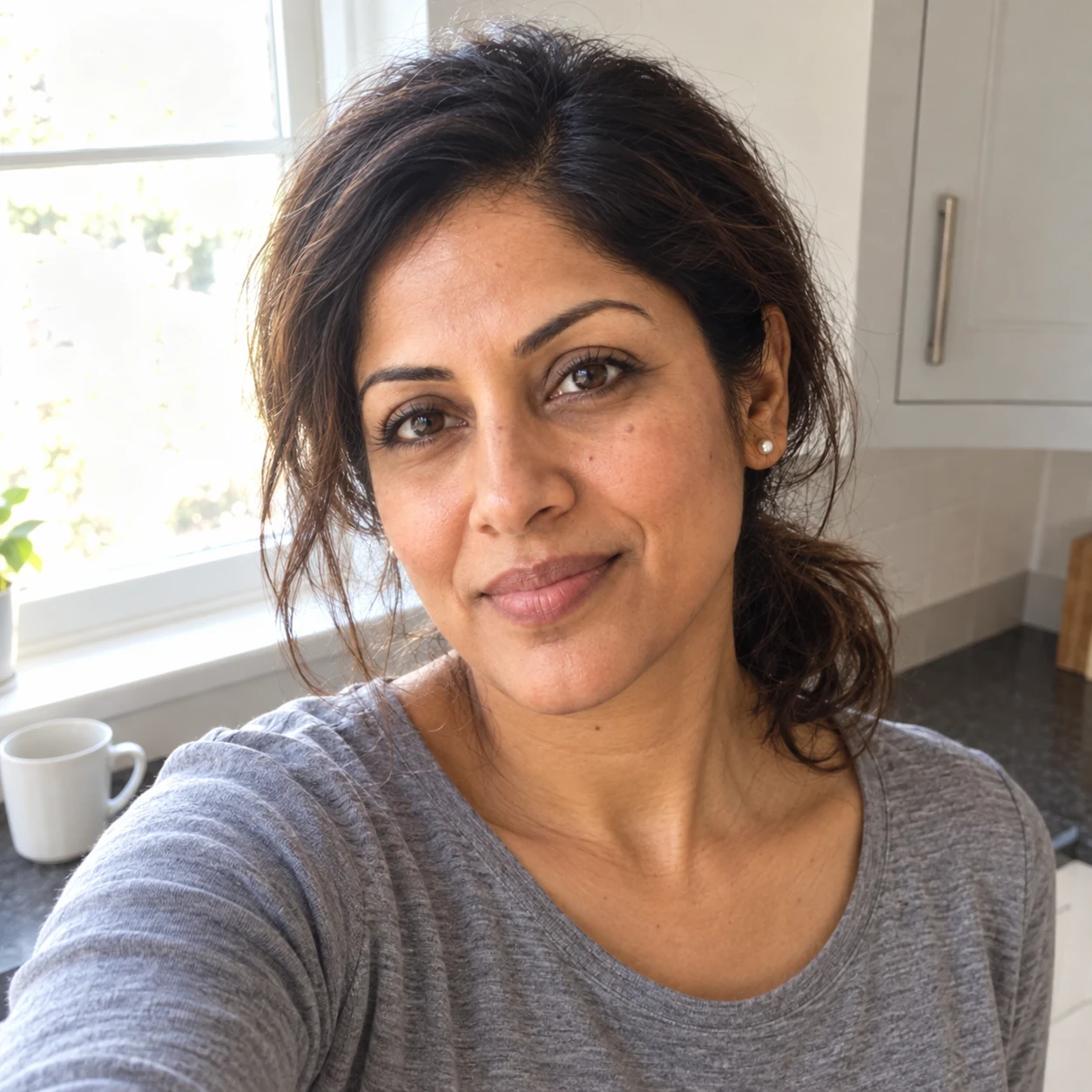
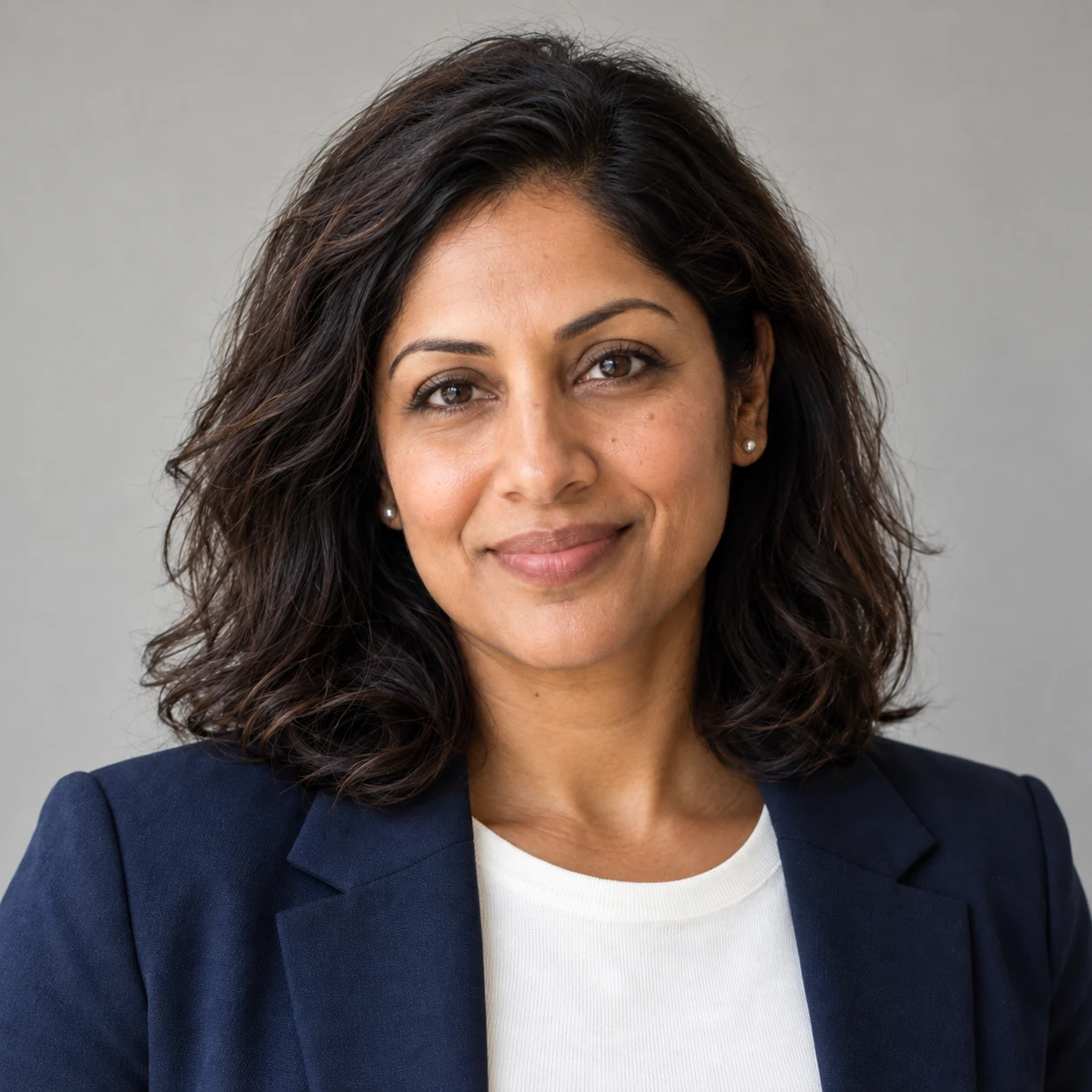
Male candidate: professional business style
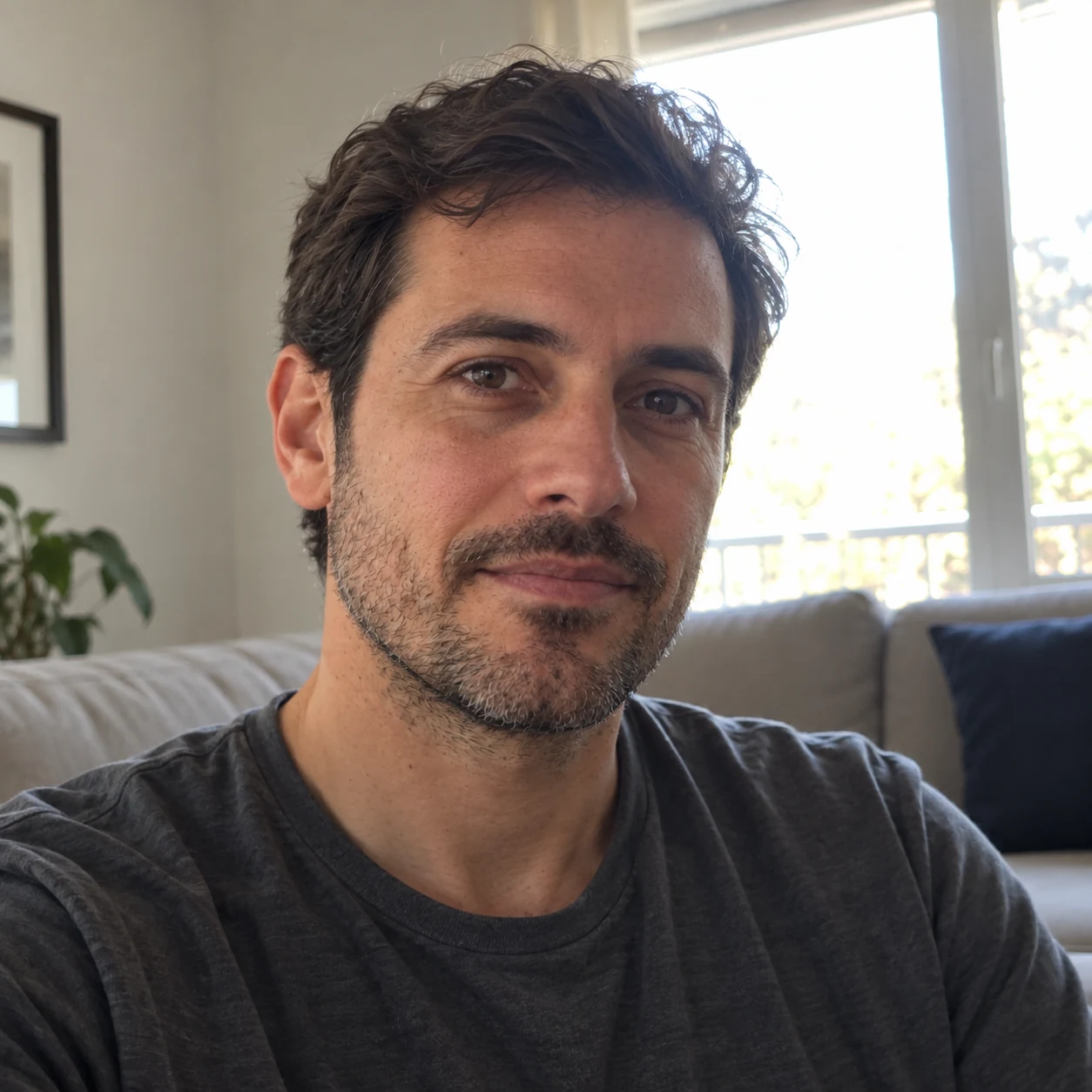
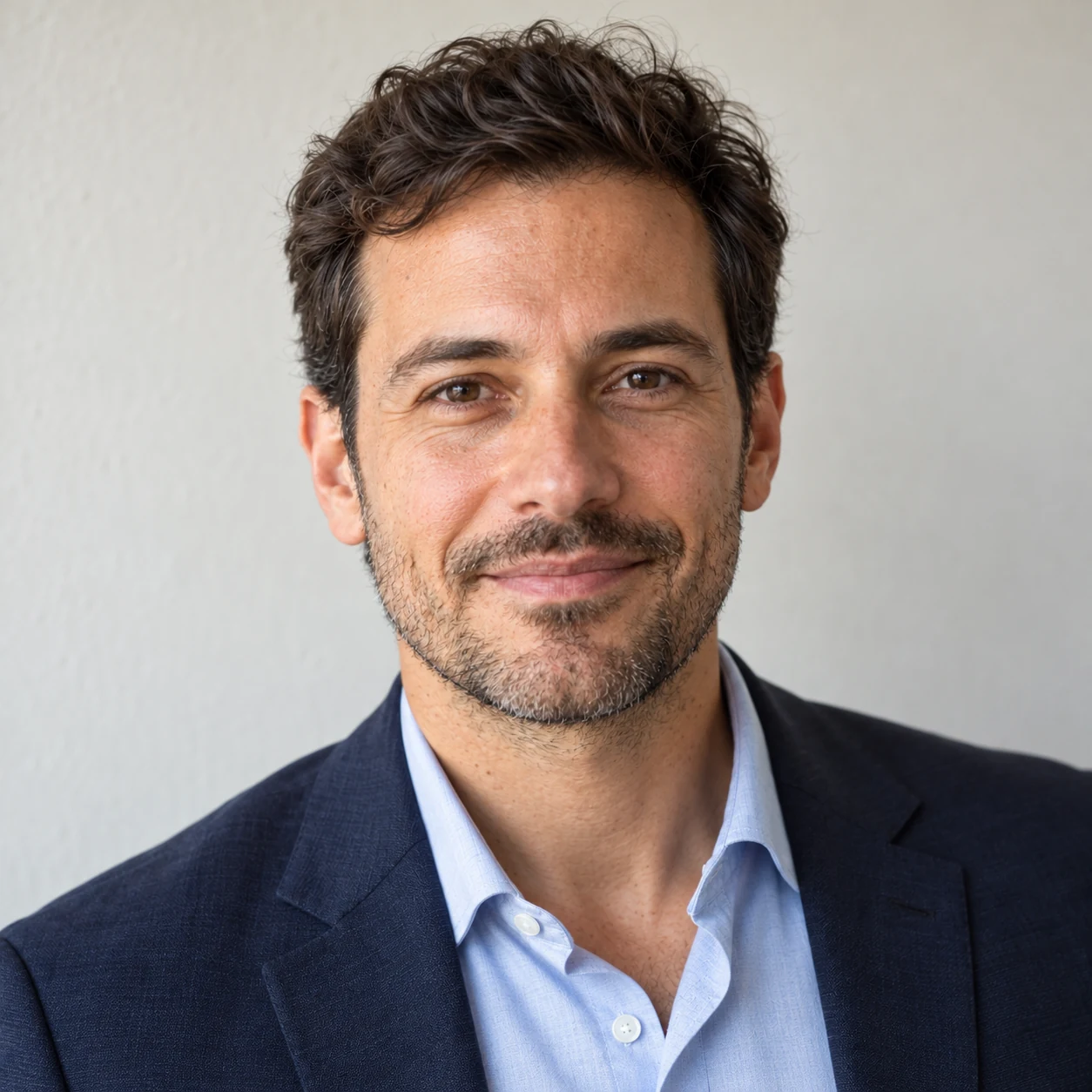
Your photo. A professional brief. Three copyable prompts.
Start with a clear, recent photo you already have. These prompts specify the wardrobe, pose, lens perspective, focus, lighting and finish, then give you a structured way to spot and correct the details that still look generated. The goal: a polished CV or LinkedIn portrait that still looks like you.
Use two stages: create, then review and refine. Copy each complete prompt into the same image-capable ChatGPT or Gemini conversation. Keep the original photo available throughout; for review and regeneration, attach the original as Image 1 and the generated portrait as Image 2. Image editing is supported by ChatGPT and Gemini; these are our editorial prompts, not a provider-certified recipe.
1. Professional AI headshot prompt: generate from your photo
Upload your original as Image 1. The default is Classic Studio: navy jacket, light background and soft studio light. For a different look, add MODERN BUSINESS or EXECUTIVE at the end of the prompt. Add KEEP MY OUTFIT if you want to retain your own clothes. No empty fields to complete.
The 85mm lens and f/4 references describe a photographic look; they do not set a real camera. The brief asks for clear eyes and enough depth of field to keep the face readable, following portrait-photography principles. OpenAI also treats camera specifications as appearance cues.
Create one photorealistic professional application portrait from my uploaded photograph, Image 1. Treat this as a carefully directed corporate portrait session followed by restrained professional retouching. The result should feel polished, credible and approachable while remaining recognisably me.

REFERENCE AND IDENTITY
Image 1 is the authority for my identity. Preserve facial proportions, face width, jaw and chin shape, nose, eye shape and spacing, eyebrows, lip shape, skin tone, apparent age, hairline, hairstyle, facial hair and visible distinguishing features. Retain natural asymmetry, glasses and any religious head covering. Do not slim my face or body, change ethnicity, make me younger, enlarge my eyes or replace my features with a generic attractive face. Keep my original expression and whether my mouth is open or closed; do not invent a different smile or new teeth. If blur, obstruction or a strong camera angle makes a faithful portrait uncertain, ask for a clearer reference before generating.

STYLE AND WARDROBE
Use CLASSIC STUDIO unless I explicitly request MODERN BUSINESS or EXECUTIVE below. Apply only one style, never a mixture.
- CLASSIC STUDIO: matte navy tailored jacket over a plain off-white top with a modest neckline; warm light-grey seamless background; balanced, welcoming business portrait.
- MODERN BUSINESS: charcoal fine-knit crew-neck top without a jacket; very light warm-grey background; soft window-like illumination and relaxed professional posture.
- EXECUTIVE: structured charcoal jacket over a plain pale-blue collared shirt; medium-grey seamless background with subtle tonal separation; composed posture and slightly more defined modelling of the face, with clear detail in both eyes.
Fit the selected clothing to my actual build and gender presentation without changing my body. Use believable fabric weight, seams, lapels, collars and folds. Preserve an existing head covering and integrate it naturally with the outfit. Do not add ties, jewellery, watches, badges, uniforms, professional credentials or logos. If I add KEEP MY OUTFIT, preserve the clothing from Image 1 instead.

CAMERA, LENS AND FOCUS
Aim for the perspective and detail of a full-frame camera with an 85mm portrait lens, positioned at eye level about 2 metres from the subject. Use an f/4-style depth of field: both eyes, brows, nose and mouth clearly resolved, with a gentle fall-off towards the ears and background. Focus on the nearer eye while keeping the second eye naturally sharp. Avoid wide-angle selfie distortion, exaggerated facial compression, a razor-thin focus plane or artificial blur across the face. ISO 100 and 1/160-second studio exposure are appearance references for clean detail and an absence of motion blur, not instructions to fabricate camera metadata. Prioritise recognisable facial geometry over changing the source perspective.

LIGHTING
For Classic Studio, use the appearance of a large diffused softbox approximately 45 degrees to camera-left and slightly above eye level. Add gentle reflector fill from camera-right, roughly one stop below the key, so shadows retain detail. For Modern Business, bring the broad key closer to the camera axis for softer, more even window-like light. For Executive, keep the key at 45 degrees and reduce the fill slightly, while preserving visible shadow-side detail. Keep light direction coherent across face, neck, clothing and glasses. Use small, plausible catchlights from the main light source; avoid duplicated or decorative reflections. Separate dark hair from the backdrop through tone, not a glowing rim. Use neutral daylight colour balance around 5200K without changing my skin tone.

POSE, FRAMING AND BACKGROUND
Make a vertical 4:5 composition, chest-up, with the complete hairstyle visible and approximately 8 percent space above the head. Keep eyes near the upper third, shoulders comfortably inside the frame and hands outside it. Use a relaxed upright posture, shoulders at a slight angle and face close to frontal, looking towards the lens when compatible with the source. Avoid forced chin extension or an unnatural neck twist. Leave enough margin for a later square crop. The background should be plain and softly separated, without office furniture, scenery, a vignette, circular blur patterns or a halo around the silhouette.

TEXTURE, COLOUR AND RETOUCHING
Preserve normal variation in skin tone, fine lines and existing skin detail. Reduce distracting shine only enough for a professional finish. Keep pores subtle at normal viewing size; do not add a synthetic pore pattern or make every hair equally sharp. Maintain believable transitions between skin, hair, ears, glasses and clothing. Keep eye whites and teeth natural. Use moderate contrast, accurate navy/charcoal fabric colours and restrained sharpening, with smooth highlight roll-off and detail in dark clothing. Avoid beauty-filter smoothing, orange-and-teal grading, HDR halos, crunchy texture, waxy skin and glamour retouching.

DELIVERABLE
Generate a single finished portrait at the highest native resolution the tool supports, preferably at least 1024 pixels on the short side if available. No collage, border, captions, added text or invented studio branding. Check visible facial geometry, eyes, clothing edges, light consistency and crop before returning the image. Identity fidelity takes priority over styling. This is an application portrait, not a passport or identity-document photograph.
2. Find the AI slop: review identity, skin, light and focus
Attach Image 1: original and Image 2: generated portrait. This prompt asks for a review only, with concrete locations and corrections. Keep the reply in the same conversation for the next step.
Review Image 2, the newly generated professional portrait, against Image 1, my original uploaded photograph. Act as a portrait photographer and retoucher performing a visible quality check. Do not generate, edit or beautify an image in this step. Use the style requested in the previous prompt as the creative brief.

REFERENCE PRIORITY
Image 1 establishes what I actually look like. Image 2 establishes the intended photographic treatment only. Judge recognisable features, not attractiveness or whether someone looks employable. Distinguish a lighting or pose difference from a changed facial feature. Where resolution or angle prevents a reliable comparison, say UNCERTAIN. Do not infer hidden features or claim a biometric identity match.

INSPECT THESE BLOCKS IN ORDER
1. Face and identity: compare face width, jaw, chin, nose, eye spacing, eyelids, eyebrows, lips, hairline, facial hair, apparent age and body proportions. Flag beautification, slimming, de-ageing, lost distinguishing features or altered expression. Treat substantial identity drift as a reason to rebuild from Image 1.
2. Eyes, mouth and glasses: inspect pupil direction, iris boundaries, plausible catchlights, eyelid edges, natural eye whites, lip boundaries and visible teeth. Check frames, arms, lens reflections and whether glasses distort the face. Do not mistake normal asymmetry for an error.
3. Skin and retouching: look for waxy patches, repetitive pores, abrupt texture changes, over-sharpened edges, fake freckles, erased lines, excessive shine and incompatible colour between face and neck. Distinguish visible defects from details too small to assess.
4. Hair, ears and silhouette: inspect the hairline, flyaways, beard transitions, ear anatomy and edges against the background. Find painted hair clumps, repeated strands, cut-out fringes and artificial rim glow.
5. Clothing and anatomy: inspect collar construction, lapel continuity, buttons, fabric folds, shoulders and neck alignment. Check that the selected outfit fits the same body, without melted seams, floating fabric, stretched proportions or invented accessories.
6. Light and colour: check that facial shadows, catchlights, glasses reflections, neck shadows and fabric highlights follow the same lighting setup. Flag blocked shadows, blown skin highlights, halos, colour casts and changes to the source skin tone.
7. Lens, focus and composition: check both eyes are clearly focused, the face has natural proportions and blur recedes plausibly. Confirm chest-up framing, full head, useful headroom, a clean background and room for a square crop. Do not pretend to recover the actual lens, aperture or camera from an AI image.
8. Final use: assess the portrait at a normal viewing size and, where image access supports it, at full resolution. Check whether it remains clear at a small CV-photo size. State when an actual size or resolution check was not possible.

REPLY IN THIS FORMAT
First give one verdict: READY FOR MY REVIEW, REVISE, or REBUILD FROM ORIGINAL. This is a visual review, not a guarantee.
Then give one row per inspection block: status (PASS / REVISE / UNCERTAIN), precise visible location, observable issue, and the smallest correction. Use image-left/image-right consistently. Mark severity as critical, noticeable or minor. If a block is fine, say what should be preserved; do not invent a defect to fill the table.
Finish with a numbered REGENERATION BRIEF containing no more than five high-priority corrections, followed by a KEEP UNCHANGED list. Make each correction executable: name the area, the visible problem and the desired change. Prioritise identity, then anatomy and eyes, then lighting and texture. Do not provide an AI-detection percentage, hiring prediction or claims that an image will pass detection.
3. Regenerate the portrait using the review comments
Keep both images attached. This prompt uses the previous review directly and preserves the details that already work. Compare the result yourself with the original, especially your eyes, nose, jaw and expression; repeat the review if necessary.
Regenerate Image 2 using the REGENERATION BRIEF and KEEP UNCHANGED list from your previous review. Produce one corrected portrait, not a new creative direction. Image 1, my original photograph, remains the authority for my face and body. Image 2 is the portrait to repair, not an identity reference.

APPLY THE REVIEW PRECISELY
Work through the prioritised corrections in order. Repair only areas supported by a visible finding. Do not treat UNCERTAIN observations as permission to invent details. If the review says REBUILD FROM ORIGINAL because my face drifted, reconstruct the portrait from Image 1 while reapplying the selected wardrobe, background, crop and lighting brief. Do not preserve an altered jaw, nose, eye spacing, age or expression merely because it already appears in Image 2.

PRESERVE WHAT WORKS
Retain the selected Classic Studio, Modern Business or Executive style; the approved outfit, body proportions, camera height, chest-up composition, headroom and background colour. Keep the intended 85mm-equivalent perspective and f/4-style focus, with both eyes clear. Preserve the established soft-key direction, appropriate fill and neutral colour balance unless the review specifically found an inconsistency there. Avoid changing unrelated pixels or restyling the whole portrait when a local correction is sufficient.

REPAIR WITHOUT HIDING
Correct artificial skin by restoring restrained, non-repeating natural texture consistent with Image 1; do not blur the face or add aggressive pores. Repair hair and beard transitions without sharpening every strand. Fix clothing edges, glasses and catchlights according to the same anatomy and light source. Reduce halos or harsh contrast locally, without flattening the entire image. Keep normal asymmetry, fine lines, original skin tone and distinguishing features. Do not whiten teeth, enlarge eyes, slim features or add makeup and accessories.

FINAL QUALITY CHECK
Before returning the image, compare the corrected face with Image 1, check each requested fix and confirm that previously sound areas remain intact. Prioritise identity over polish if the instructions conflict. Return one vertical 4:5 portrait at the highest native resolution available, with the full head and useful crop margins. No comparison collage, labels, extra objects or added branding. If a missing or unclear original prevents a faithful correction, ask me for that reference instead of guessing. Leave final identity approval to me.
Using your portrait in Switzerland, Germany or Austria
Choose the look for the role and employer. Country guidance changes how you prepare the application; it does not require a different face, skin tone or camera lens.
Switzerland: Bewerbungsfoto for your Swiss CV
For a Swiss application, check the portrait inside the complete dossier. Swiss job platform jobs.ch recommends a current, authentic image, clothing suited to the employer and a photo that supports the CV without dominating it. Swiss photo guidance.
Make the whole application look considered. See the Swiss CV and cover-letter examples, or check whether to include a Swiss CV photo.
Germany: Bewerbungsfoto mit KI for a German application
A photo is your choice. Germany's Federal Employment Agency describes application photos as optional and recommends role-appropriate clothing and a neutral setting when you use one. AI retouching still needs to leave you recognisable. German photo guidance.
Give your experience the same attention as your portrait. See a German CV and Anschreiben together, then use the examples to review your own application.
Austria: Bewerbungsfoto for an Austrian Lebenslauf
Austria's AMS describes CV photos as customary while confirming that a photo cannot be insisted upon. It recommends restrained editing and placing the image near the name and contact details. Choose a crop that fits your layout and check the exported PDF at normal size. AMS CV guidance and photo guidance.
Move from a finished portrait to a coherent application. See the Austrian CV and Bewerbungsschreiben examples.
From a stronger portrait to your next application
Your portrait is one part of the first impression. DraftApply's country examples put the CV, letter and illustrative job-fit review together, so you can see how the whole application reads. Choose your market above, review the examples and follow the application action when you are ready. Generate and refine the photo in your chosen image tool.
Where the prompt approach comes from
We reviewed Reddit's professional-headshot prompt discussion alongside the official editing and photography guidance linked above. Community replies report useful results as well as changed appearances; they are anecdotes, not a success-rate study. The three prompts here are original briefs. Our fictional illustrations were made with earlier prompts and do not validate this exact sequence on real people.